

🚨⚠️ I HAVE REACHED HUGGING FACE'S FREE STORAGE LIMIT ⚠️🚨
I can no longer upload new models unless I can cover the cost of additional storage.
I host 70+ free models as an independent contributor and this work is unpaid.
Without your support, no more new models can be uploaded.
🎉 Patreon (Monthly) | ☕ Ko-fi (One-time)
Every contribution goes directly toward Hugging Face storage fees to keep models free for everyone.
96% fewer refusals (4/100 Uncensored vs 97/100 Original) while preserving model quality (0.0452 KL divergence).
❤️ Support My Work
Creating these models takes significant time, work and compute. If you find them useful consider supporting me:

| Platform | Link | What you get |
|---|---|---|
| 🎉 Patreon | Monthly support | Priority model requests |
| ☕ Ko-fi | One-time tip | My eternal gratitude |
Your help will motivate me and would go into further improving my workflow and coverings fees for storage, compute and may even help uncensoring bigger model with rental Cloud GPUs.
GGUF quantizations of llmfan46/MiniMax-M2.7-BF16-ultra-uncensored-heretic.
This is a decensored version of amd/MiniMax-M2.7-BF16, made using Heretic v1.2.0 with the Arbitrary-Rank Ablation (ARA) method
Abliteration parameters
| Parameter | Value |
|---|---|
| start_layer_index | 0 |
| end_layer_index | 51 |
| preserve_good_behavior_weight | 0.9996 |
| steer_bad_behavior_weight | 0.0005 |
| overcorrect_relative_weight | 1.1241 |
| neighbor_count | 12 |
Targeted components
- attn.o_proj
Performance
| Metric | This model | Original model (MiniMax-M2.7-BF16) |
|---|---|---|
| KL divergence | 0.0452 | 0 (by definition) |
| Refusals | ✅ 4/100 | ❌ 97/100 |
Lower refusals indicate fewer content restrictions, while lower KL divergence indicates more closeness to the original model's baseline. Higher refusals cause more rejections, objections, pushbacks, lecturing, censorship, softening and deflections.
🧠 Thinking and Instruct Mode Switch
Default: Thinking Mode ON - Model reasons through problems step-by-step.
To use Instruct Mode (thinking mode OFF):
You can easily do it on GGUFs in LM Studio too, in LM Studio go inside "Inference" and scroll all the way down to "Prompt Template", inside Prompt Template scroll all the way down until you find:
Delete everything is there, then go here:
Copy the whole thing and then go back into LM Studio "Prompt Template" and paste the chat template that you just copied.
And there you have the model in Instruct Mode.
Quantizations
| Filename | Quant | Description |
|---|---|---|
| MiniMax-M2.7-BF16-ultra-uncensored-heretic-BF16.gguf | BF16 | Full precision |
| MiniMax-M2.7-BF16-ultra-uncensored-heretic-Q8_0.gguf | Q8_0 | Near-lossless, recommended |
| MiniMax-M2.7-BF16-ultra-uncensored-heretic-Q6_K.gguf | Q6_K | Excellent quality |
| MiniMax-M2.7-BF16-ultra-uncensored-heretic-Q5_K_M.gguf | Q5_K_M | Good balance |
| MiniMax-M2.7-BF16-ultra-uncensored-heretic-Q5_K_S.gguf | Q5_K_S | Smaller Q5 |
| MiniMax-M2.7-BF16-ultra-uncensored-heretic-Q4_K_M.gguf | Q4_K_M | Good for limited VRAM |
| MiniMax-M2.7-BF16-ultra-uncensored-heretic-Q4_K_S.gguf | Q4_K_S | Smaller Q4 |
| MiniMax-M2.7-BF16-ultra-uncensored-heretic-Q3_K_L.gguf | Q3_K_L | Low VRAM, decent quality |
| MiniMax-M2.7-BF16-ultra-uncensored-heretic-Q3_K_M.gguf | Q3_K_M | Low VRAM, smaller |
| MiniMax-M2.7-BF16-ultra-uncensored-heretic-Q3_K_S.gguf | Q3_K_S | Very Low VRAM, smallest |
Usage
Works with llama.cpp, LM Studio, Ollama, and other GGUF-compatible tools.
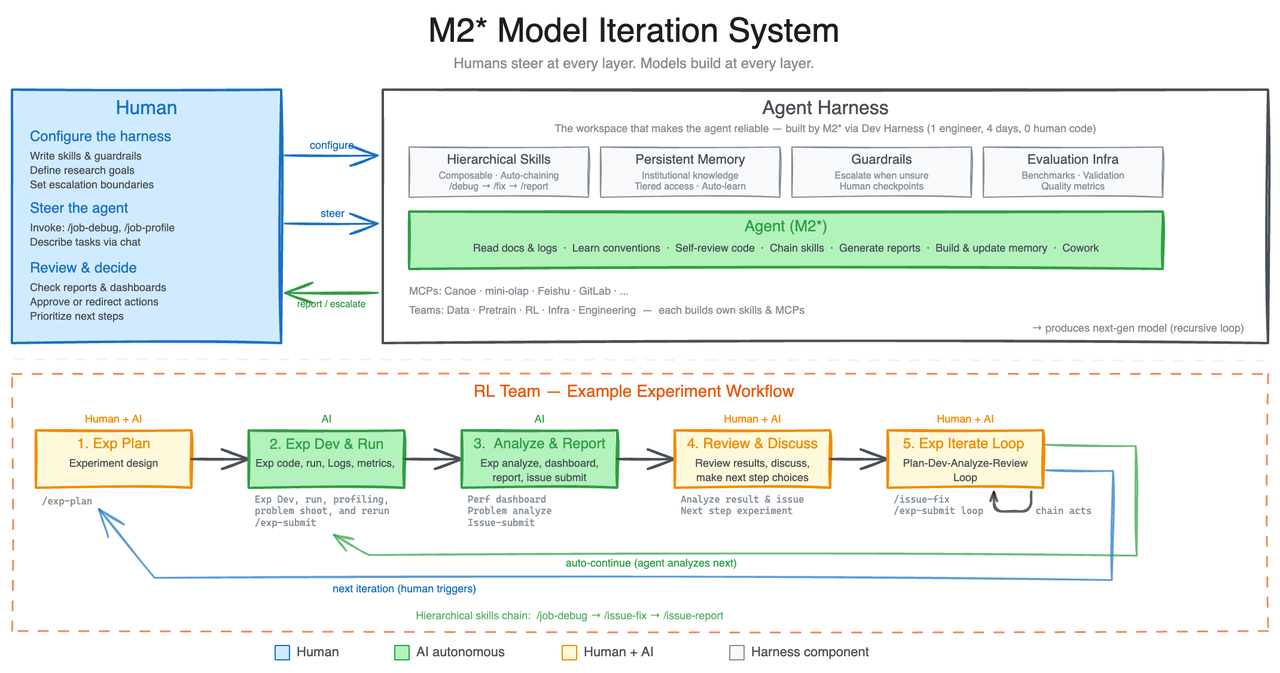
MiniMax-M2.7 is our first model deeply participating in its own evolution. M2.7 is capable of building complex agent harnesses and completing highly elaborate productivity tasks, leveraging Agent Teams, complex Skills, and dynamic tool search. For more details, see our blog post.
Model Self-Evolution
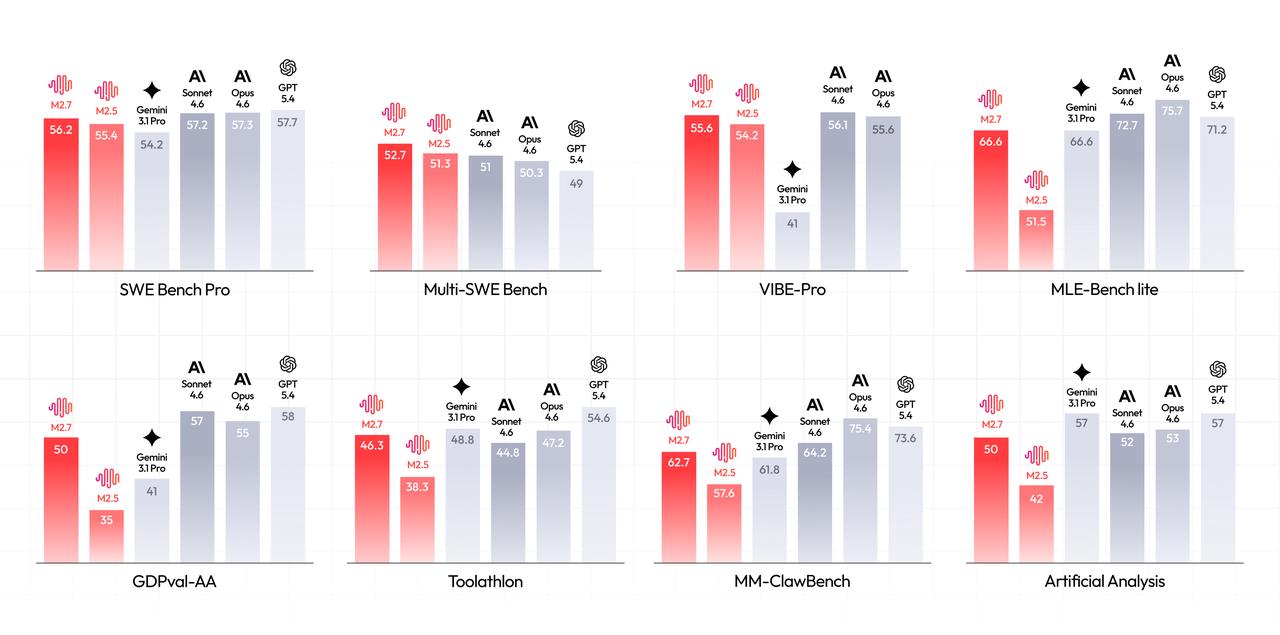
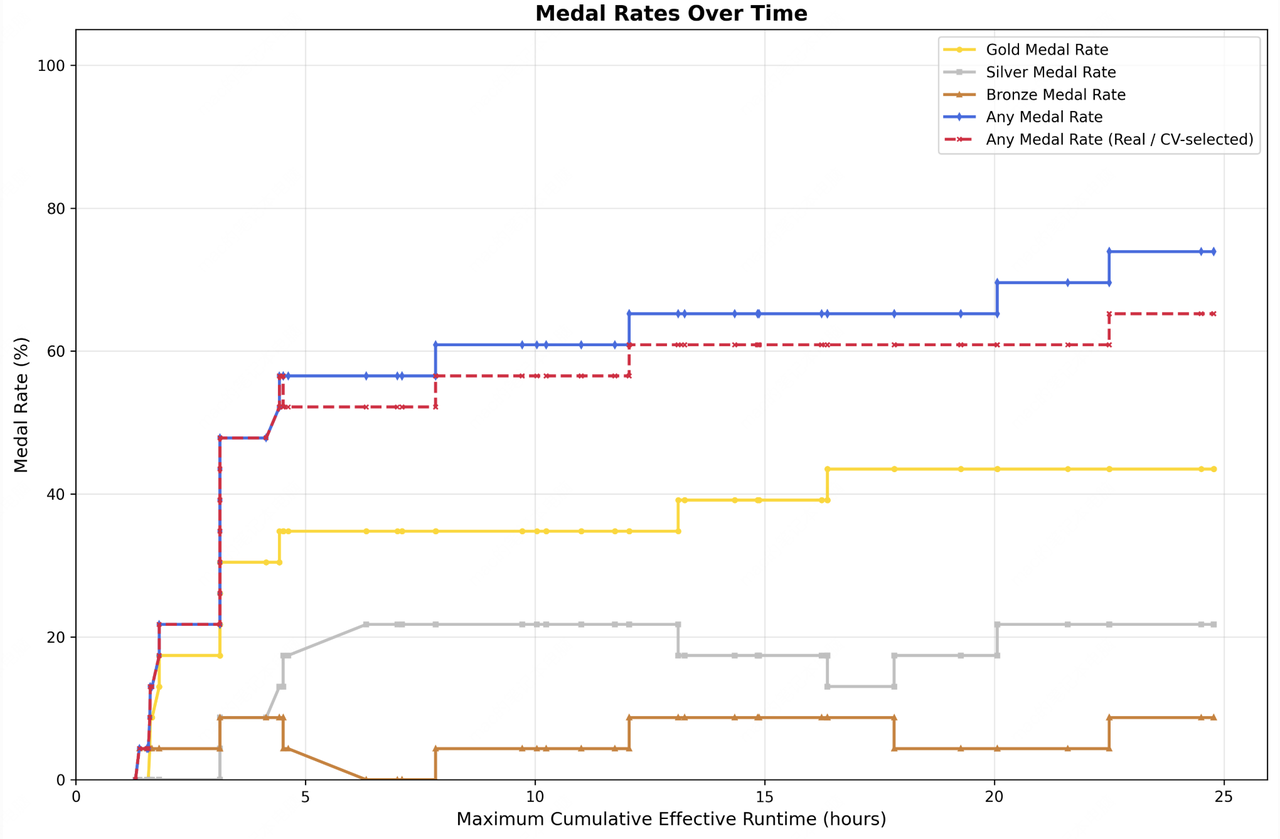
M2.7 initiates a cycle of model self-evolution: during development, we let the model update its own memory, build dozens of complex skills for RL experiments, and improve its own learning process based on experiment results. An internal version of M2.7 autonomously optimized a programming scaffold over 100+ rounds — analyzing failure trajectories, modifying code, running evaluations, and deciding to keep or revert — achieving a 30% performance improvement. On MLE Bench Lite (22 ML competitions), M2.7 achieved a 66.6% medal rate, second only to Opus-4.6 and GPT-5.4.
Professional Software Engineering
M2.7 delivers outstanding real-world programming capabilities spanning log analysis, bug troubleshooting, refactoring, code security, and machine learning. Beyond code generation, M2.7 demonstrates strong system-level reasoning — correlating monitoring metrics, conducting trace analysis, verifying root causes in databases, and making SRE-level decisions. Using M2.7, we have reduced live production incident recovery time to under three minutes on multiple occasions.
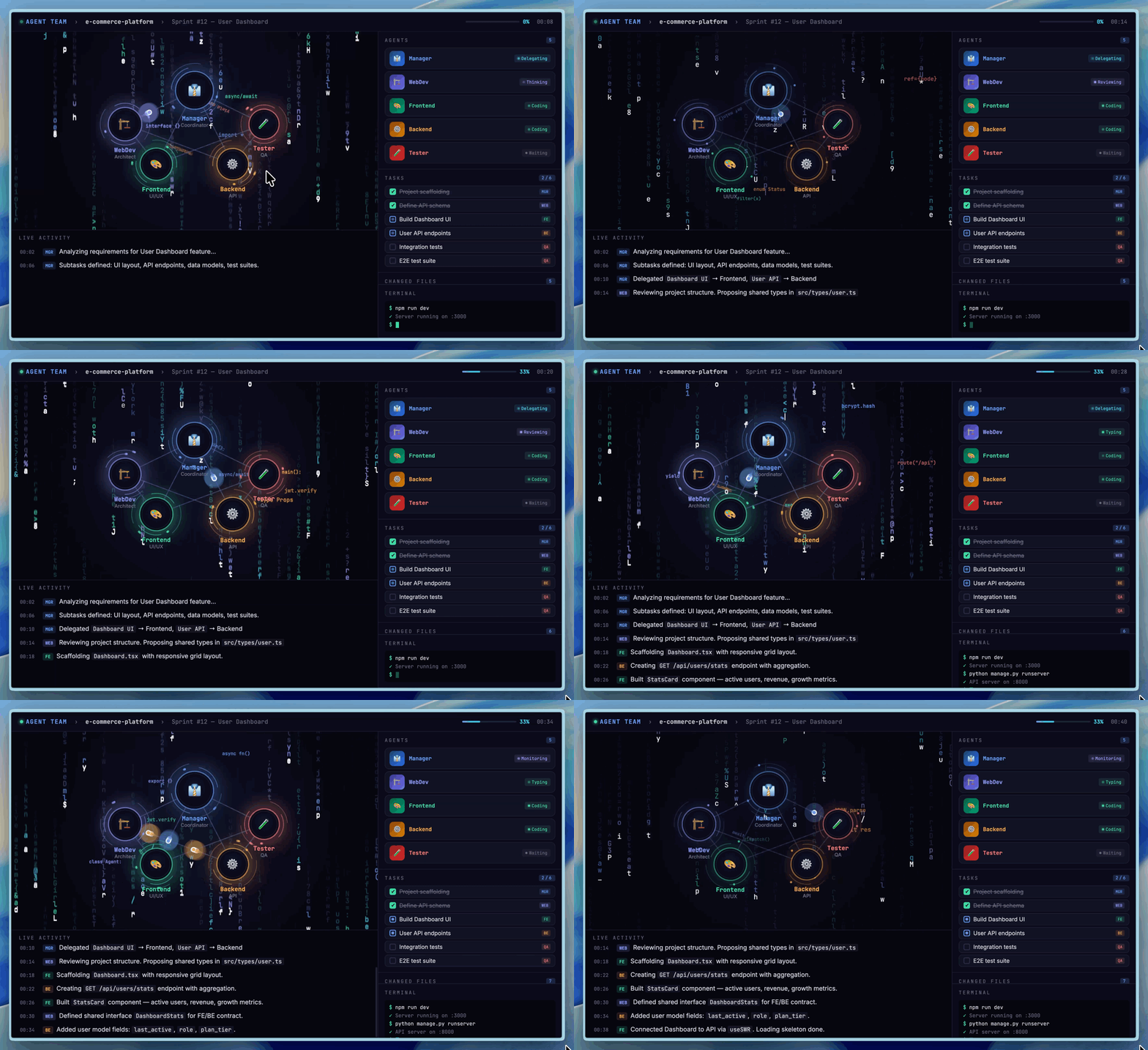
On SWE-Pro, M2.7 achieved 56.22%, matching GPT-5.3-Codex, with even stronger performance on real-world engineering benchmarks: SWE Multilingual (76.5) and Multi SWE Bench (52.7). On VIBE-Pro (55.6%), M2.7 is nearly on par with Opus 4.6. On Terminal Bench 2 (57.0%) and NL2Repo (39.8%), M2.7 demonstrates deep understanding of complex engineering systems. M2.7 also supports native Agent Teams for multi-agent collaboration with stable role identity and autonomous decision-making.
Professional Work
M2.7 achieved an ELO score of 1495 on GDPval-AA (highest among open-weight models), surpassing GPT5.3. It handles Word, Excel, and PPT with high-fidelity multi-round editing, producing editable deliverables. On Toolathon, M2.7 reached 46.3% accuracy (global top tier), and maintains 97% skill compliance across 40+ complex skills on MM Claw. On the MM Claw end-to-end benchmark, M2.7 achieved 62.7%, close to Sonnet 4.6.
Entertainment
M2.7 features strengthened character consistency and emotional intelligence. We open-sourced OpenRoom, an interactive demo that places AI interaction within a Web GUI space with real-time visual feedback and scene interactions. Try it at openroom.ai.
How to Use
- MiniMax Agent: https://agent.minimax.io/
- MiniMax API: https://platform.minimax.io/
- Token Plan: https://platform.minimax.io/subscribe/token-plan
Local Deployment Guide
Download the model from HuggingFace repository: https://huggingface.co/MiniMaxAI/MiniMax-M2.7
We recommend using the following inference frameworks (listed alphabetically) to serve the model:
SGLang
We recommend using SGLang to serve MiniMax-M2.7. Please refer to our SGLang Deployment Guide.
vLLM
We recommend using vLLM to serve MiniMax-M2.7. Please refer to our vLLM Deployment Guide.
Transformers
We recommend using Transformers to serve MiniMax-M2.7. Please refer to our Transformers Deployment Guide.
ModelScope
You also can get model weights from modelscope.
NVIDIA NIM
MiniMax M2.7 is also available on NVIDIA NIM Endpoint.
Inference Parameters
We recommend using the following parameters for best performance: temperature=1.0, top_p = 0.95, top_k = 40. Default system prompt:
You are a helpful assistant. Your name is MiniMax-M2.7 and is built by MiniMax.
Tool Calling Guide
Please refer to our Tool Calling Guide.
Contact Us
Contact us at model@minimax.io.
License
NON-COMMERCIAL LICENSE Non-commercial use permitted based on MIT-style terms; commercial use requires prior written authorization. Copyright (c) 2026 MiniMax Permission is hereby granted, free of charge, to any person obtaining a copy of this software and associated documentation files (the "Software"), to deal in the Software for non-commercial purposes, including without limitation the rights to use, copy, modify, merge, publish, distribute, sublicense, and/or provide copies of the Software, and to permit persons to whom the Software is furnished to do so, subject to the following conditions:
- The above copyright notice and this permission notice shall be included in all copies or substantial portions of the Software.
- If the Software (or any derivative works thereof) is used for any Commercial Use, you shall prominently display "Built with MiniMax M2.7" on a related website, user interface, blogpost, about page or product documentation.
- Any Commercial Use of the Software or any derivative work thereof is prohibited without obtaining a separate, prior written authorization from MiniMax. To request such authorization, please contact api@minimax.io with the subject line "M2.7 licensing".
- "Commercial Use" means any use of the Software or any derivative work thereof that is primarily intended for commercial advantage or monetary compensation, which includes, without limitation: (i) offering products or services to third parties for a fee, which utilize, incorporate, or rely on the Software or its derivatives, (ii) the commercial use of APIs provided by or for the Software or its derivatives, including to support or enable commercial products, services, or operations, whether in a cloud-based, hosted, or other similar environment, and (iii) the deployment or provision of the Software or its derivatives that have been subjected to post-training, fine-tuning, instruction-tuning, or any other form of modification, for any commercial purpose. THE SOFTWARE IS PROVIDED "AS IS", WITHOUT WARRANTY OF ANY KIND, EXPRESS OR IMPLIED, INCLUDING BUT NOT LIMITED TO THE WARRANTIES OF MERCHANTABILITY, FITNESS FOR A PARTICULAR PURPOSE AND NONINFRINGEMENT. IN NO EVENT SHALL THE AUTHORS OR COPYRIGHT HOLDERS BE LIABLE FOR ANY CLAIM, DAMAGES OR OTHER LIABILITY, WHETHER IN AN ACTION OF CONTRACT, TORT OR OTHERWISE, ARISING FROM, OUT OF OR IN CONNECTION WITH THE SOFTWARE OR THE USE OR OTHER DEALINGS IN THE SOFTWARE.
Appendix: Prohibited Uses You agree you will not use, or allow others to use, the Software or any derivatives of the Software to:
- Generate or disseminate content prohibited by applicable laws or regulations.
- Assist with, engage in or otherwise support any military purpose.
- Exploit, harm, or attempt to exploit or harm minors.
- Generate or disseminate false or misleading information with the intent to cause harm.
- Promote discrimination, hate speech, or harmful behavior against individuals or groups based on race or ethnic origin, religion, disability, age, nationality and national origin, veteran status, sexual orientation, gender or gender identity, caste, immigration status, or any other characteristic that is associated with systemic discrimination or marginalization.
- Downloads last month
- 12,886
3-bit
4-bit
5-bit
6-bit
8-bit
16-bit
Model tree for llmfan46/MiniMax-M2.7-ultra-uncensored-heretic-GGUF
Base model
MiniMaxAI/MiniMax-M2.7