

jina-embeddings-v5-omni
Collection
Multimodal (text + image + video + audio) embedding models aligned with jina-embeddings-v5-text-*. Two sizes, four task variants each. • 27 items • Updated • 36

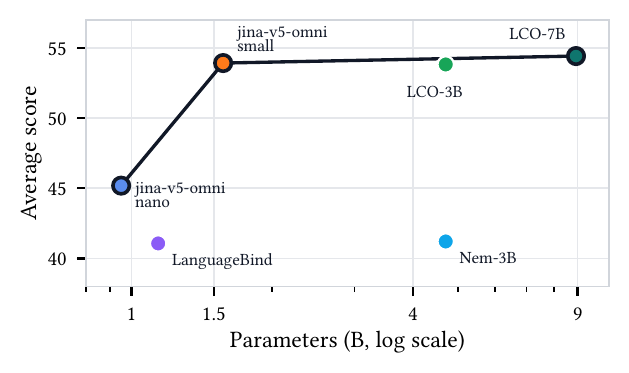
Average score vs. parameter count across image (MIEB-Lite), video (MMEB-V), and audio (MAEB) benchmarks — jina-v5-omni-nano and jina-v5-omni-small define the open-weight frontier (Table 1 in the ArXiv report).

jina-embeddings-v5-omni-small-text-matching is a multimodal embedding model that accepts text, images, video, and audio and produces embeddings in a shared vector space aligned with the text-only jinaai/jina-embeddings-v5-text-small-text-matching — so you can index with text and query with any modality, no reindexing. For a more compact alternative, see jinaai/jina-embeddings-v5-omni-nano-text-matching.
This is the text-matching-targeted variant of the jina-embeddings-v5-omni-small family. The combined repo containing all task adapters is jinaai/jina-embeddings-v5-omni-small.
| Feature | Value |
|---|---|
| Parameters | ~1.56B |
| Embedding Dimension | 1024 |
| Supported Tasks | text-matching |
| Max Sequence Length | 32768 |
| Pooling Strategy | Last-token |
| Supported Inputs | text, image, video, audio |
| Supported File Types | images: .jpg, .jpeg, .png, .gif, .webp, .bmp, .tif, .tiff, .avif, .heic, .svg; video: .mp4, .avi, .mov, .mkv, .webm, .flv, .wmv; audio: .wav, .mp3, .flac, .ogg, .m4a, .opus; documents: .pdf |
| Matryoshka Dimensions | 32, 64, 128, 256, 512, 768, 1024 |
The fastest way to use v5-omni in production. Elastic Inference Service (EIS) provides managed embedding inference with built-in scaling, so you can generate embeddings directly within your Elastic deployment.
# Retrieve the configuration of the preconfigured omni-small inference endpoint
GET /_inference/embedding/.jina-embeddings-v5-omni-small

# Generate an embedding for a single piece of text using the predefined endpoint
POST _inference/embedding/.jina-embeddings-v5-omni-small
{
  "input": [
    "This is a test"
  ]
}

# Fuse a text description and an image into a single embedding via a multimodal content block
POST _inference/embedding/.jina-embeddings-v5-omni-small
{
  "input": [
    {
      "content": [
        { "type": "text",  "value": "A small blue square" },
        { "type": "image", "format": "base64", "value": "<BASE64_IMAGE_DATA>" }
      ]
    }
  ]
}

# Create a custom endpoint that truncates omni-small embeddings to 32 dimensions
PUT _inference/embedding/jina-omni-small-32d
{
  "service": "elastic",
  "service_settings": {
    "model_id": "jina-embeddings-v5-omni-small",
    "dimensions": 32
  }
}
See the Elastic Inference Service documentation for setup details.
# core
pip install transformers torch pillow numpy

# Optional — install only the extras for the modalities you actually use:
pip install librosa soundfile      # audio decoding
pip install torchcodec                # video decoding for proc(videos=path) (transformers default backend)
pip install av imageio imageio-ffmpeg # video decoding for SentenceTransformer model.encode("clip.mp4") and np.ndarray video inputs
pip install pdf2image pypdfium2    # PDF rendering
pip install cairosvg pillow    # SVG rendering
pip install "vllm==0.20.1"        # high-throughput serving (validated)
pip install sentence-transformers  # one-call multimodal API
For minimum versions see the Requirements section below (transformers >= 4.57, torch >= 2.5; vLLM path validated with vllm == 0.20.1).
from PIL import Image
import librosa, torch
from transformers import AutoModel, AutoProcessor, WhisperFeatureExtractor

repo = "jinaai/jina-embeddings-v5-omni-small-text-matching"
model = AutoModel.from_pretrained(repo, trust_remote_code=True).eval()
proc  = AutoProcessor.from_pretrained(repo, trust_remote_code=True)

# model.embed(**inputs) returns L2-normalized last-token embeddings.
t_vec = model.embed(**proc(text="Document: A cute cat sitting on a mat.", return_tensors="pt").to(model.device))
i_vec = model.embed(**proc(images=Image.open("photo.jpg"), text="<|vision_start|><|image_pad|><|vision_end|>", return_tensors="pt").to(model.device))
v_vec = model.embed(**proc(videos="clip.mp4", text="<|vision_start|><|video_pad|><|vision_end|>", return_tensors="pt").to(model.device))
# Needs torchcodec or torchvision. On Windows or envs without either, use model.encode("clip.mp4") from the sentence-transformers section below (av-only, no codec libs required).

# Audio has no string placeholder — build token ids from config.
audio, _ = librosa.load("speech.wav", sr=16000)
feat = WhisperFeatureExtractor(feature_size=128)(audio, sampling_rate=16000, return_tensors="pt")["input_features"]
cfg = model.config
n   = feat.shape[-1] // 4
ids = torch.tensor([[cfg.audio_start_token_id, *[cfg.audio_token_id]*n, cfg.audio_end_token_id]])
a_vec = model.embed(
    input_ids=ids.to(model.device),
    attention_mask=torch.ones_like(ids).to(model.device),
    input_features=feat.to(model.device, dtype=next(model.parameters()).dtype),
)
This model uses a Document: text prefix. The raw model.embed(...) path above explicitly prepends "Document: " to the text input, and via sentence-transformers (below) the same intent is expressed with the encode_document() helper. The vLLM path also expects the "Document: " prefix in the prompt string. Calling encode(text) (or embed(...)) on raw text without the prefix is off-distribution for this model.
No dtype, device, min_pixels, or custom pooling code needed — sensible defaults live in the model config (bf16 weights, 256–1280 vision tokens).
transformers>=4.57 (recommend >=5.1 for the small variants)torch>=2.5Optional:
sentence-transformers — one-call API for all 4 modalitieslibrosa — audio decodingtorchcodec (or torchvision) — video decoding when calling proc(videos=…) directly (transformers' video processor selects torchcodec by default, falling back to torchvision)av — video decoding via model.encode("clip.mp4") (SentenceTransformer path) and for in-memory np.ndarray video inputsvllm==0.20.1 — high-throughput serving; H100 deployments may also need DeepGEMM installed for vLLM FP8 kernelsBy default all components (vision + audio towers + text encoder) are loaded. To save memory, pick a subset — the unused towers are skipped at load time:
from transformers import AutoModel

AutoModel.from_pretrained("jinaai/jina-embeddings-v5-omni-small-text-matching", trust_remote_code=True, modality="omni")    # all (default)
AutoModel.from_pretrained("jinaai/jina-embeddings-v5-omni-small-text-matching", trust_remote_code=True, modality="vision")  # vision + text
AutoModel.from_pretrained("jinaai/jina-embeddings-v5-omni-small-text-matching", trust_remote_code=True, modality="audio")   # audio + text
AutoModel.from_pretrained("jinaai/jina-embeddings-v5-omni-small-text-matching", trust_remote_code=True, modality="text")    # text only
Same parameter works via sentence-transformers:
SentenceTransformer("jinaai/jina-embeddings-v5-omni-small-text-matching", trust_remote_code=True, model_kwargs={"modality": "vision"})
from sentence_transformers import SentenceTransformer

model = SentenceTransformer("jinaai/jina-embeddings-v5-omni-small-text-matching", trust_remote_code=True)

# URLs, local paths (with or without extension), PIL.Image, np.ndarray,
# torch.Tensor, bytes, and BytesIO are all accepted directly.
t_vec = model.encode_document("A cute cat sitting on a mat.")
i_vec = model.encode("https://huggingface.co/datasets/huggingface/documentation-images/resolve/main/transformers/tasks/car.jpg")
v_vec = model.encode("https://huggingface.co/datasets/raushan-testing-hf/videos-test/resolve/main/sample_demo_1.mp4")  # needs `pip install av`
a_vec = model.encode("https://huggingface.co/datasets/Narsil/asr_dummy/resolve/main/mlk.flac")  # needs `pip install librosa soundfile`

# Fused multimodal — a tuple becomes ONE embedding in a single forward pass:
emb = model.encode(("Winter boots, waterproof leather upper",
                    "https://.../boot.jpg"))
No dtype, device, min_pixels, or custom pooling code needed — sensible defaults live in the model config (bf16 weights, 256–1280 vision tokens).
Path (.mp4 .avi .mov .mkv .webm .flv .wmv, or extensionless — content-sniffed), HTTP(S) URL, bytes/io.BytesIO, and in-memory np.ndarray / torch.Tensor of shape (T, H, W, 3|4) with dtype uint8. In-memory arrays are encoded to MP4 on the fly (needs pip install imageio imageio-ffmpeg).
import numpy as np
# (T, H, W, 3) uint8 — e.g. from decord, imageio, or an rgb frame buffer
frames = np.zeros((16, 224, 224, 3), dtype=np.uint8)
v_vec = model.encode(frames)
Validated with vllm==0.20.1. The model card already provides the pooling config, so no custom PoolerConfig is needed.
from vllm import LLM
llm = LLM(
    model="jinaai/jina-embeddings-v5-omni-small-text-matching",
    runner="pooling",
    trust_remote_code=True,
)
outs = llm.embed([{"prompt": "Document: A cute cat sitting on a mat."}])
Or via CLI: vllm serve jinaai/jina-embeddings-v5-omni-small-text-matching --trust-remote-code.
All three backends support truncating the full embedding to a shorter dimension with L2 re-normalization, so the result stays unit-norm:
# transformers
vec = model.embed(truncate_dim=256, **proc(text="hello", return_tensors="pt"))
# or
vec = model.encode(["hello"], task="retrieval", truncate_dim=256)

# sentence-transformers
vec = model.encode("hello", truncate_dim=256)

# vLLM — ask the pooler for a smaller embedding
from vllm import PoolingParams
outs = llm.embed(prompts, pooling_params=PoolingParams(dimensions=256))
# or truncate + renormalize the full-dim output yourself:
import numpy as np
full = np.asarray(outs[0].outputs.embedding)
vec = full[:256] / np.linalg.norm(full[:256])
Pass a list to encode many inputs in one call.
# sentence-transformers — any modality
t_vecs = model.encode(["query 1", "query 2"])
i_vecs = model.encode([Image.open("a.jpg"), Image.open("b.jpg")])
v_vecs = model.encode(["clip1.mp4", "clip2.mp4"])
a_vecs = model.encode(["speech1.wav", "speech2.wav"])

# raw transformers — text (native padded batch)
inputs = proc(text=["query 1", "query 2"], padding=True, truncation=True, return_tensors="pt").to(model.device)
vecs = model.embed(**inputs)  # (2, dim)

# vLLM — list of request dicts, any modality
outs = llm.embed([
    {"prompt": "query 1"},
    {"prompt": "query 2"},
])
For sentence-transformers, images / video / audio are forwarded per-sample (one forward pass each). Text is truly batched. For large-scale multimodal throughput, prefer vLLM.
Embeddings produced by this model share a vector space with:
jinaai/jina-embeddings-v5-text-small-text-matching — text-onlyjinaai/jina-embeddings-v5-text-small (via matching adapter)You can index text with the v5-text-small model and query it with image,
video, or audio embeddings from jina-embeddings-v5-omni-small-text-matching — no reindexing.
CC BY-NC 4.0. For commercial use, contact us.